.
.USER Function
Set the screen button functions when the USER button is pressed in shooting mode.
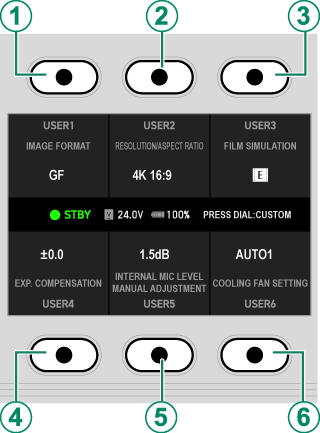
| Screen buttons | Default |
|---|---|
AScreen button 1 |
IMAGE FORMAT |
BScreen button 2 |
RESOLUTION/ASPECT |
CScreen button 3 |
FILM SIMULATION |
DScreen button 4 |
EXP. COMPENSATION |
EScreen button 5 |
INT/EXT MIC LEVEL MANUAL ADJUSTMENT |
FScreen button 6 |
COOLING FAN SETTING |
Assigning Roles to the Screen Buttons
Press the center of the selector dial on the USER display to change the functions assigned to each screen button. The functions to be assigned are as follows:
- IMAGE FORMAT
- RESOLUTION/ASPECT
- PROJECT FPS
- BITRATE
- FILM SIMULATION
- IRIS
- EXP. COMPENSATION
- PHOTOMETRY
- SELF-TIMER
- IS MODE
- IS MODE BOOST
- TONE CURVE
- COLOR
- SHARPNESS
- NOISE REDUCTION
- SUBJECT DETECTION SETTING
- TOUCH SCREEN MODE
- INT/EXT MIC LEVEL ADJUSTMENT
- INT/EXT MIC LEVEL MANUAL ADJUSTMENT
- WAVEFORM/VECTORSCOPE
- FOCUS PEAK HIGHLIGHT
- COOLING FAN SETTING
- LCD BRIGHTNESS
- LCD COLOR
- NON
To disable the screen button, choose NON.